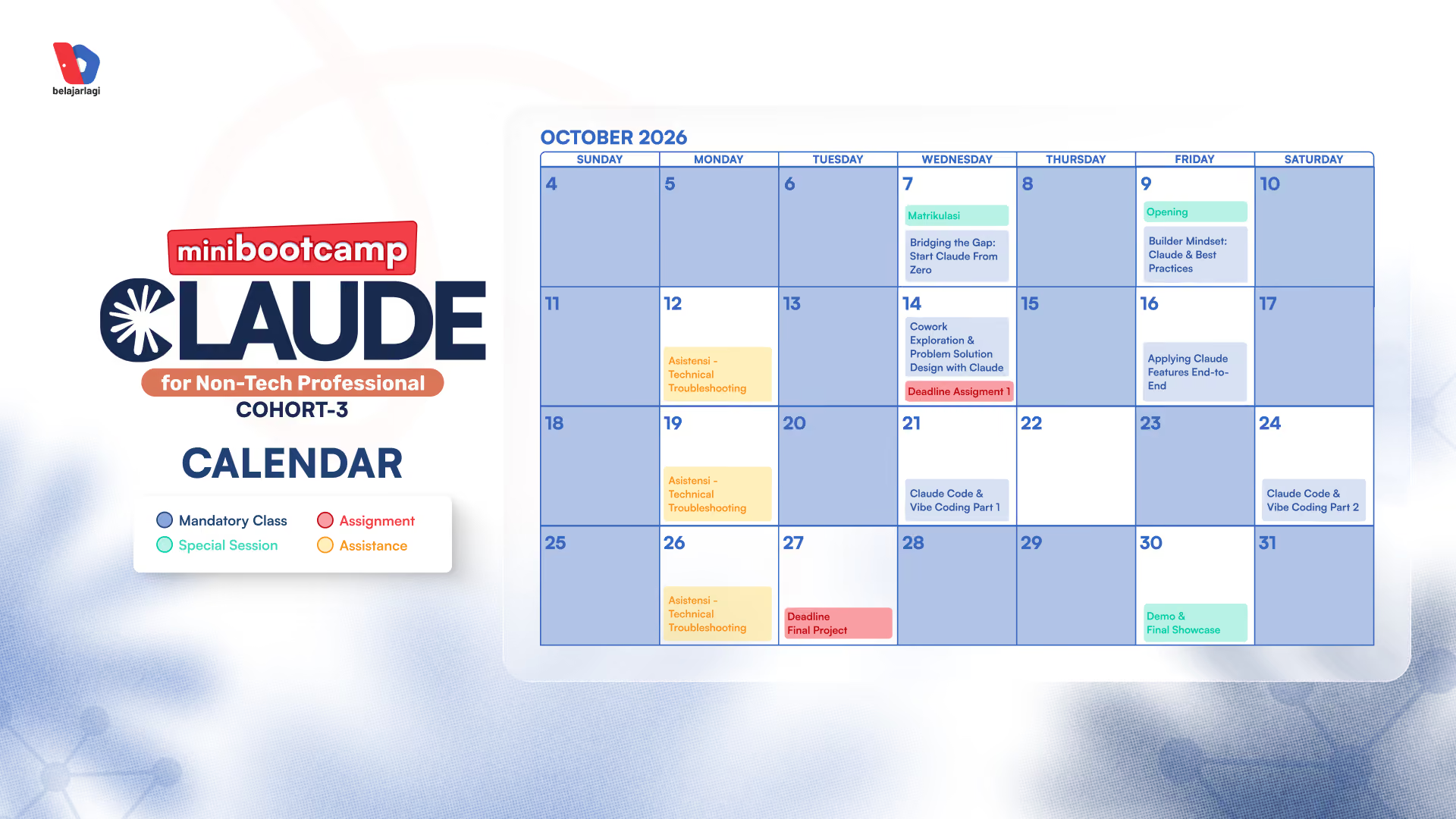






Day 0: Matriculation Class - Rabu, 7 Oktober 2026 | 19.00 WIB
Bridging the Gap: Start Claude From Zero
- Introduction to Claude
- Understanding Claude's capabilities & models
- How to work with Claude on your desktop
- Introduction to Projects, creating with Artifacts, and working with Skills
- Other ways to work with Claude (Design, Office 365, Chrome, Cowork)
- Connecting your tools & researching with Claude
- Tools Installation Needs & Program Goals
Day 1: Builder Mindset: Claude & Best Practices - Jumat, 9 Oktober 2026 | 19.00 WIB
Opening Mini Bootcamp Claude for Non-Tech Professional Cohort 3
- Claude Chat, Skills & Projects Best Practices
- Why your AI output feels generic: context engineering & prompting techniques
- Use case: context engineering & prompting
- Claude Cowork: what it can do that Claude Chat cannot
- Claude Cowork: what it can do that Claude Chat cannot
- Assignment 1 Brief
Day 2:Asistensi - Technical Troubleshooting - Senin, 12 Oktober 2026 | 19.00 WIB
- Pattern recap: common blockers from Day 1 & Assignment 1
- Live screen-sharing dan problem-solving bersama Teaching Assistant
Day 3: Cowork Exploration & Problem Solution Design with Claude - Rabu, 14 Oktober 2026 | 19.00 WIB
- Cowork Exploration & Best Practices for Working Safely (data privacy & permissions)
- MCP Connectors & Plugins
- Fire Spiral Method:
- OBSERVE, frame the problem before solving it
- EXPERIMENT, test different paths and learn from the gaps
- INTEGRATE, decide what moves forward and challenge what still holds you back
Day 4: Applying Claude Features End-to-End - Jumat, 16 Oktober 2026 | 19.00 WIB
- Day 3 recap: bring back what survived INTEGRATE
- Build a real solution using Claude features (Skill, Artifact, Connector, Projects, Cowork)
- Connect to external services via third-party (API integration, payment modules, etc)
- Going further: Claude Code for solutions that need to live as a real product (theory)
- Best practice end-to-end solution building & tools implementation
- Final Project Brief
Day 5: Asistensi - Technical Troubleshooting - Senin, 19 Oktober 2026 | 19.00 WIB
- Pattern recap: common blockers from Day 3 - 4
- Live screen-sharing dan problem-solving bersama Teaching Assistant
- Check Point Tools Preparation
Day 6: Claude Code & Vibe Coding Part 1 | Rabu, 21 Oktober 2026 | 19.00 WIB
- Claude Access: Web vs Apps vs Terminal, when to use it?
- Try Claude Code on the web/apps first
- Move to Claude Code in the terminal (hands-on setup & first run)
- Vibe Code Framework: Spec Kit
- BRIEF, write a one-pager before touching Claude Code
- ASK, the interview flip, have Claude Code question you first
Day 7: Claude Code & Vibe Coding Part 2 - Sabtu, 24 Oktober 2026 | 19.00 WIB
- Vibe Code Framework Part 2: Spec Kit
- Day 6 recap: BRIEF & ASK
- BITE, build small, test fast
- CHECK, define what good looks like
- The core skill of working with Claude Code
- Avoiding technical debt: how to prompt Claude Code for clean, maintainable output from the start
- Testing your app: how to verify your build works without reading the code
- Realistic boundaries: what non-developers can and cannot do at this stage
Day 8: Asistensi - Technical Troubleshooting - Senin, 26 Oktober 2026 | 19.00 WIB
- Pattern recap: common blockers from Days 6 - 7 and Final Project Task
- Live screen-sharing and problem-solving with the Teaching Assitant
Day 9: Demo & Final Showcase - Jumat, 30 Oktober 2026 | 19.00 WIB
- Demonstrasi Prototype from Selected Students
- Feedback from Instructor
Graduation Mini Bootcamp Claude for Non-Tech Professional Cohort 3
Catatan: Kelas Day 0 s.d. Day 9 dilaksanakan via Zoom selama 2–2.5 jam dan berbahasa Indonesia

.avif)